Fix UTM Drift in 90 Days: UTM Naming Conventions for Marketing Teams
UTM naming conventions for marketing teams: enforce a small controlled vocabulary, use templates, and stop tagging drift in 30–90 days.

Fix UTM Drift in 90 Days: UTM Naming Conventions for Marketing Teams
Use utm_source, utm_medium, and utm_campaign on every external campaign link, always lowercase and hyphen-separated, backed by a controlled vocabulary and one named owner. That’s the entire foundation. Everything else, from utm_term to utm_id, is optional add-on tracking you layer in only when you’ll actually act on the data it produces. Skip the governance piece and your taxonomy will drift within a quarter no matter how clean your first campaign looked.
TL;DR:
- Using lowercase hyphen-separated values from a controlled vocabulary for
utm_source,utm_medium, andutm_campaignensures consistent, reliable reporting across platforms.- Inconsistent casing or free-typed values in UTMs cause fragmented data, misclassification, and distorted channel performance insights in GA4 reports.
- Adopting a clear, repeatable naming formula for campaign names and reserving extra parameters for specific uses reduces analysis noise and improves data clarity.
- Enforcing UTM governance with a dedicated owner, validation tools, and regular audits prevents taxonomy drift and maintains data accuracy over time.
- Combining a standardized naming convention with tools like Getpaidlens helps identify and fix existing tagging issues, safeguarding your marketing attribution accuracy.
Table of Contents
- What Do the Standard UTM Parameters Actually Do?
- Why Does Inconsistent UTM Naming Wreck Your Reports?
- Cryptic, Positional, or Key-Value: Which UTM Naming Model Fits Your Team?
- The UTM Naming Best Practices Checklist Your Team Should Actually Follow
- Copy-Paste UTM Naming Patterns for Every Channel
- Who Should Own Your UTM Taxonomy, and How Do You Enforce It?
- The Most Common UTM Mistakes and How to Fix Them
- Your 30 to 90 Day UTM Rollout Plan
- Lessons From Watching UTM Governance Succeed and Fail
- Where Paid Lens Fits Once Your UTMs Are Clean
- Sources
- FAQ
What Do the Standard UTM Parameters Actually Do?
Five parameters make up the classic UTM structure, and a sixth has become essential for anyone syncing cost data into GA4. Knowing what each one is for, not just what it’s called, is what separates a naming convention that survives contact with three ad platforms from one that collapses into “(not set)” rows within a month.
utm_sourceidentifies where the traffic originated:google,newsletter,linkedin.utm_mediumidentifies the channel type:cpc,email,social,referral.utm_campaignidentifies the specific initiative:q2-product-launch,spring-sale.utm_termcaptures paid search keywords, mostly useful for manually tagged search campaigns where auto-tagging isn’t in play.utm_contentdifferentiates creative variants or placements within the same campaign, such asheader-ctaversussidebar-cta.utm_idis a stable campaign identifier used mainly to reconcile cost data, and it should map back to your ad platform’s own campaign ID rather than a human-readable name.
Only three of those are non-negotiable. utm_source, utm_medium, and utm_campaign form the minimum set required for consistent, comparable reporting, and utm_term and utm_content should only get added when there’s a concrete plan to use that extra granularity, since unused parameters mostly just create analysis noise.
One wrinkle catches teams constantly: gclid auto-tagging from Google Ads can override or coexist with manual UTMs depending on your GA4 configuration, and parameter values are case-sensitive across every major analytics platform. Email and email register as two different mediums. That single detail is the root cause of more broken reports than any other UTM mistake, which is exactly why utm_id needs to stay a stable identifier pulled from your campaign management system, never a mutable campaign name.
Why Does Inconsistent UTM Naming Wreck Your Reports?
Case sensitivity is the silent killer of clean attribution data. GA4’s Default Channel Grouping logic reads utm_medium values to bucket traffic into channels like Paid Search or Organic Social, and it does this through exact string matching. Type Email in one campaign and email in the next, and GA4 treats them as two separate mediums rather than merging them into one channel.
The downstream damage shows up as fragmented reporting: a campaign that actually drove 4,000 sessions gets split across three or four differently-cased or misspelled variants, each looking unimpressive on its own. Worse, when utm_medium doesn’t match a value GA4 recognizes at all, sessions often land in “Unassigned” or get mis-bucketed into a channel that has nothing to do with the actual traffic source. Aligning your medium values to GA4-native terms like cpc, email, and social avoids that mis-grouping entirely.
This is where budget decisions go wrong. A performance manager staring at a channel report showing “Organic Social” underperforming might cut spend there, unaware that half the paid social traffic got miscategorized as organic because someone typed utm_medium=social instead of utm_medium=paid-social. The fix wasn’t a creative problem. It was a taxonomy problem masquerading as a performance problem, and it’s the kind of error that a controlled vocabulary catches before it ever reaches a dashboard.
Cryptic, Positional, or Key-Value: Which UTM Naming Model Fits Your Team?
Every UTM naming strategy falls into one of three broad models, and picking the wrong one for your scale is how taxonomies fall apart within two quarters.
- Cryptic codes use short, opaque strings like
q2b2orsm-047that map to a lookup table elsewhere. They’re compact and fast to generate programmatically, but nobody can read them at a glance, and if the lookup table gets lost or out of sync, the data becomes unreadable. - Positional naming relies on a fixed field order separated by delimiters, such as
region-quarter-program-tactic, where meaning comes from position rather than labels. It’s compact and highly parsable for SQL and warehouse joins, but it breaks the moment someone adds a field out of order or forgets a segment. - Key-value naming spells out each attribute explicitly, like
program-webinar_tactic-retargeting_quarter-q2, so anyone reading the raw string understands it without a reference sheet.
For most marketing teams, key-value or a light hybrid of key-value and positional naming is the right call. It’s self-documenting, which matters enormously when a new hire or an agency partner starts tagging links six months after the convention was written. Positional naming earns its keep in high-volume programmatic or automated systems where a predictable field order like region-quarter-program-tactic makes SQL parsing safe and repeatable across thousands of auto-generated links. Pure cryptic codes make sense only at extreme volume, think ad networks generating tens of thousands of links daily, where storage and string length genuinely matter more than human readability.
If you’re not running that kind of volume, don’t borrow that model. Readability wins almost every argument at normal marketing scale.
The UTM Naming Best Practices Checklist Your Team Should Actually Follow
Most UTM naming guidance out there is vague advice dressed up as a framework. Here’s the version you can hand to anyone touching a campaign link, whether they’re on your team or at an agency.
- Lowercase everything, always. No exceptions for brand names, acronyms, or “just this once.” Case sensitivity fragments your data across every platform that reads UTMs.
- Use hyphens as your only separator. Never spaces, never underscores mixed with hyphens. Consistent hyphen use is one of the most repeated recommendations across UTM checklists, because mixed separators are what make a taxonomy unsearchable six months later.
- Drop
.com,.io, and other domain suffixes from source values.linkedin, notlinkedin.com. It’s shorter and it’s what every existing GA4 default channel mapping expects. - Stick to letters, numbers, and hyphens only. No ampersands, no slashes, no special characters that might get URL-encoded and break the tag.
- Require
utm_source,utm_medium, andutm_campaignon every single external link. No campaign goes live without all three. - Add
utm_termonly for manually tagged paid search. If auto-tagging handles it, skip it. - Add
utm_contentonly when you’re running an A/B test or multiple creative variants you intend to compare. - Use
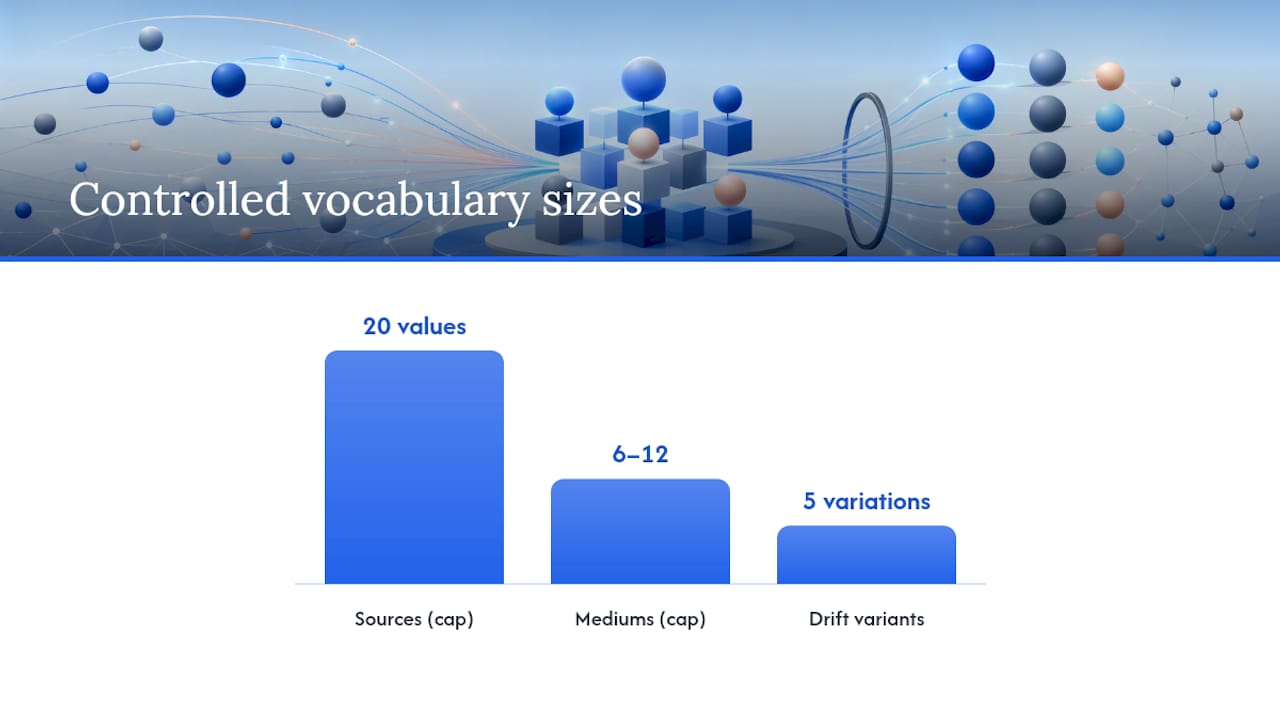
utm_idwhen cost data needs to reconcile with GA4, and pull that ID from your ad platform, never from a typed campaign name. - Cap your source list around 20 values and your medium list between 6 and 12. Small, fixed controlled vocabularies are the single biggest defense against taxonomy drift, and a list that size is small enough that one person can memorize it.
- Build campaign names with a repeatable formula: something like
program-tactic-period, sowebinar-retargeting-q2reads the same way every time.
Pro Tip: Print your controlled vocabulary list, the actual approved source and medium values, and pin it somewhere every campaign creator sees before they open a link builder. Half of taxonomy drift comes from people improvising because they didn’t know the approved list existed, not because they ignored it.
The number that matters most here isn’t the rule count. It’s the vocabulary size. Twenty source values and a dozen mediums sound restrictive until you realize that’s roughly what a mid-sized team actually uses in practice anyway, they just never wrote it down, so five slightly different spellings crept in over eighteen months.
Copy-Paste UTM Naming Patterns for Every Channel
Templates beat theory. Here’s what a clean campaign link actually looks like across the channels most teams run.
-
Email newsletter:
?utm_source=newsletter&utm_medium=email&utm_campaign=q2-product-launch&utm_content=header-cta -
Paid search (manually tagged):
?utm_source=google&utm_medium=cpc&utm_campaign=brand-search-evergreen&utm_term=utm-naming-conventions -
Paid social:
?utm_source=linkedin&utm_medium=paid-social&utm_campaign=q2-webinar-retargeting -
Organic social:
?utm_source=linkedin&utm_medium=social&utm_campaign=q2-webinar-promo -
QR code / direct mail (offline):
?utm_source=direct-mail&utm_medium=qr&utm_campaign=fall-catalog-drop
Notice utm_medium=paid-social versus plain social for the organic post. That single hyphenated word is the difference between GA4 correctly bucketing paid spend into Paid Social and quietly dumping it into Organic Social, where it inflates a channel you’re not actually paying for.
On campaign names, the quarter-or-evergreen decision matters more than people think. A recurring brand search campaign that runs year-round should stay evergreen, brand-search-evergreen, so it doesn’t fragment into brand-search-q1, brand-search-q2, and so on when nothing about the campaign actually changed. A time-boxed initiative like a product launch or a seasonal promotion should carry a relative period marker such as q2 or fy26-h1 rather than a full date, which keeps the string parsable for year-over-year SQL queries without hardcoding a date format that changes every campaign.
The QR code example matters more than it looks. Offline channels get forgotten in most naming conventions, and then someone tags a print ad with utm_medium=other or leaves it blank, and that entire channel becomes invisible in reporting. Treat qr and print as first-class medium values, not afterthoughts.
Who Should Own Your UTM Taxonomy, and How Do You Enforce It?
A naming convention without an owner is a suggestion. It’ll get followed for exactly as long as the person who wrote the doc is actively policing links, and it collapses the week they go on vacation.
The owner should sit in marketing operations or analytics, not because that team runs more campaigns, but because they’re the ones who feel the pain first when the taxonomy breaks. Their job isn’t to approve every single link. It’s to maintain the single source of truth (a shared spreadsheet or wiki page listing every approved source and medium value) and run a lightweight approval process when someone needs a new value added.
- Keep the controlled vocabulary in one place everyone can access, not scattered across old Slack threads or someone’s personal notes.
- Require a quick approval step, even just a Slack message to the owner, before adding a new source or medium value to the list.
- Roll out a shared UTM builder (a Google Sheet with dropdowns, a dedicated builder tool, or a Google Tag Manager template) so campaign creators pick from the approved list instead of typing free text.
- Use URL-validation scripts or link-shortener rules that flag or reject tags with uppercase letters, spaces, or values outside the approved vocabulary.
- Schedule a quarterly audit of raw UTM values against the approved list to catch drift before it compounds.
Teams that document and actively enforce a small controlled vocabulary report meaningfully less taxonomy drift than teams relying on a written guide alone, which tells you something important: the document isn’t the control. The enforcement mechanism is.
Pro Tip: If your team runs campaigns across multiple ad platforms, build the UTM builder as a Google Tag Manager template or a shared spreadsheet with data validation dropdowns rather than a static doc. A static doc gets ignored. A dropdown that only offers approved values physically prevents the mistake.
The Most Common UTM Mistakes and How to Fix Them
Most UTM problems trace back to a small handful of repeat offenders, and the fixes are almost always faster than the diagnosis.
- Tagging internal links. Adding UTMs to links between your own site’s pages overwrites the visitor’s original source, erasing the very data you’re trying to protect. Never UTM-tag internal navigation, ever.
- Inconsistent casing.
Email,email, andEMAILall register as separate values. This is almost always the single largest source of fragmented reporting. - Free-typed source values. Anyone typing
fbone week andfacebookthe next is generating duplicate channels that look like separate traffic sources in every report. - Missing
utm_medium. A link with source and campaign but no medium often lands in an unexpected default channel grouping, distorting comparisons across campaigns. - Spaces instead of hyphens. Spaces get URL-encoded into
%20, which is unreadable in raw exports and breaks pattern matching in downstream SQL.
Internal link tagging, casing inconsistency, and free-typed source values together account for the bulk of UTM fragmentation across the teams that audit for it. The good news: a quick GA4 acquisition report or a raw-events export will surface most of these within minutes, since fragmented values show up as near-duplicate rows sitting right next to each other.
For remediation, you’ve got two paths. Fixing live assets means updating the actual links in your email templates, ad platforms, and social scheduling tools, which stops new fragmentation immediately but doesn’t touch historical data. Backfill normalization in your data warehouse means writing a mapping table that consolidates known variants (Email and email both map to email) at the reporting layer, which cleans up historical trend analysis without touching a single live link. Most teams need both: fix the source going forward, normalize the past so year-over-year comparisons still make sense.
Your 30 to 90 Day UTM Rollout Plan
Publishing a naming convention and actually getting it adopted are two different projects. Here’s the sequence that gets a taxonomy from documented to enforced without stalling every campaign in the meantime.
- Immediately: Publish the taxonomy doc with your controlled vocabulary, install a shared UTM builder (spreadsheet or GTM template), and train the two or three highest-volume link creators on the new rules first. Don’t wait for full team training before shipping the doc.
- Within 30 days: Pull your top-traffic campaigns from the last quarter and audit their UTMs against the new standard. Fix the highest-impact fragments first, the ones distorting your biggest channels, rather than trying to clean everything at once.
- Within 60 to 90 days: Automate link generation wherever campaign volume justifies it, add validation checks (a script or shortener rule that rejects non-compliant tags), and run a review of the controlled vocabulary itself. A short rollout that fixes top-traffic fragments first and layers in automation afterward is what lets a naming convention actually survive quarter over quarter, instead of decaying the way most well-intentioned taxonomy docs do.
The order matters here. Teams that try to automate before they’ve fixed the highest-impact historical fragments end up automating a broken pattern at scale, which is worse than the manual mess they started with.
Lessons From Watching UTM Governance Succeed and Fail
The governance trap almost every team falls into isn’t a bad taxonomy. It’s a good taxonomy nobody enforces. I’ve seen teams write genuinely excellent naming docs, then watch them decay within two quarters because the doc lived in a folder nobody opened and the “owner” was a title, not an actual responsibility with a review cadence attached.
The trade-off worth making early is speed for control on the controlled vocabulary itself, not on every individual link. Spend real time getting your source and medium lists right, because that list is expensive to change once campaigns are live against it. Don’t spend equal time manually reviewing every single tagged link; that’s where automation belongs. A dropdown-based builder or a validation script catches more errors than a human reviewer ever will, mostly because it never gets tired or skips a step at 5 p.m. on a Friday.
The shortcut that actually works: build the taxonomy around what your reporting tools already expect, GA4’s native medium values, your ad platforms’ default groupings, rather than inventing your own vocabulary from scratch. Fighting the platform’s defaults is friction you don’t need.
— Shraddha
Where Paid Lens Fits Once Your UTMs Are Clean
A naming convention tells you how data should look. It doesn’t tell you where your actual campaigns are quietly breaking that rule right now, or which of the fifty fragmented values in your GA4 export are actually worth fixing first. That’s a different problem, and it’s the one Getpaidlens was built to solve.
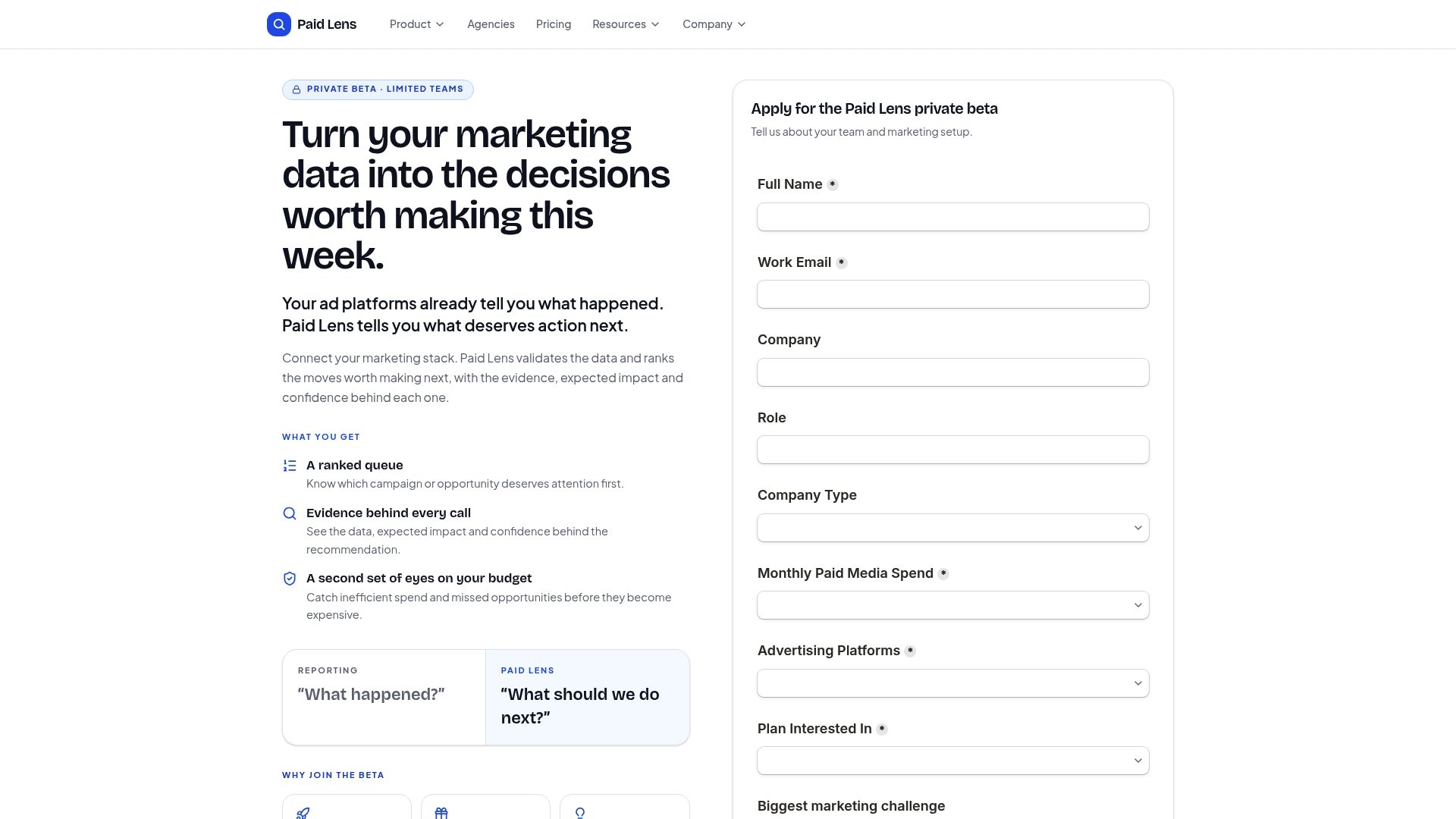
Getpaidlens connects to your ad platforms and analytics stack, validates the data flowing through, and surfaces exactly where inconsistent tagging or channel mis-grouping is distorting your reporting, ranked by how much budget impact each fix would actually have. Instead of manually cross-referencing a GA4 export against your controlled vocabulary list, you get a prioritized queue that says which fragmented campaign is worth your next hour. It’s a natural complement to the naming rules in this guide, not a replacement for them: the taxonomy prevents new mess, and the attribution layer finds the mess that’s already there. If your team is managing budgets across multiple platforms and wants to see how connecting your ad accounts and CRM data surfaces these issues automatically, check current pricing and see where your account would fit.
Sources
- UTM Parameters Guide for Enterprise Campaigns
- UTM Parameters Best Practices: 21-Point Checklist (2026) | UTM.io
- The 2026 UTM Tagging Guide: A Complete, Dated Reference for Marketing Teams - Terminus Blog
- Google Analytics 4 utm_id / campaign id explained
FAQ
What are the five UTM parameters?
The five standard parameters are utm_source, utm_medium, utm_campaign, utm_term, and utm_content, with utm_id increasingly used as a sixth for cost-data reconciliation in GA4.
What are examples of good UTM naming conventions?
A clean example looks like utm_source=linkedin&utm_medium=paid-social&utm_campaign=q2-webinar-retargeting, always lowercase, hyphen-separated, and pulled from a documented controlled vocabulary rather than typed freehand.
What are the most common UTM mistakes?
The biggest offenders are tagging internal links (which overwrites the original traffic source), inconsistent capitalization, free-typed source values that create duplicate channels, and missing utm_medium values that distort GA4’s channel grouping.
How should I structure a UTM campaign name?
Use a repeatable formula like program, tactic, and period, for example webinar-retargeting-q2, and reserve full date suffixes for time-boxed campaigns while keeping recurring programs evergreen so they don’t fragment every quarter.
Do I need utm_term and utm_content on every link?
No. Add utm_term only for manually tagged paid search and utm_content only when testing multiple creative variants you actually plan to compare, since unused parameters mainly add noise without adding insight.